
Thursday, January 24, 2008
SQL Server - Include column headers when copying or saving results
If you ever copy and paste your query results from SQL Server Management Studio into Excel or Notepad, you will definitely want to check this option under Tools - Options (Query Results - SQL Server - Results to Grid). Otherwise you will not get the column headers.


Wednesday, January 16, 2008
FontConverter.ConvertFromInvariantString - Add Italics
I didn't find the MSDN documentation very complete when it came to this. It was fairly obvious that I could feed "Verdana, 15.75pt" into the ConvertFromInvariantString method and get the right font returned, but I wasn't sure how to make that Italic. Since I am using this to skin my application, I wanted to put this string in a config file.
FontConverter fc = new FontConverter();Font headerFont = (Font)fc.ConvertFromInvariantString("Verdana, 15.75pt, style=Italic");
FontConverter fc = new FontConverter();Font headerFont = (Font)fc.ConvertFromInvariantString("Verdana, 15.75pt, style=Italic");
Monday, January 7, 2008
How to create a screenshots of modal dialogs in Windows Vista!
This is one that was bugging the hell out of me. I've been using Windows Vista for a while now and have been trying to keep the User Account Control on, but slowly tweak it so that it is usable. One of the problems I kept running into was that certain User Account Control dialogs were globally modal and prevented me from getting screenshots. The only thing they allowed you to do was click "Allow" or "Cancel." I couldn't find anything online to resolve this and even the Windows Vista Snipping Tool wouldn't work. Ultimately, I found my answer in the security options for User Account Control:
- Open the Start - Run menu and type secpol.msc.
- Navigate to Security Settings - Local Policies - Security Options.
- Disable "User Account Control: Switch to the secure desktop when prompting for elevation."
- Voila! You can now use PrtScn and Alt+PrtScn or the Windows Vista Snipping Tool like before.
Wednesday, January 2, 2008
MSDN Webcast Portal - Seven Deadly Clicks!
First let me say that if you haven't checked out the WPF Soup To Nuts Webcast Series, I highly recommend it. My only problem here is that it takes a total of seven clicks to get to the content! Come on...where's that Web 2.0 experience?! If only they could throw these on MSDN Channel9.


Monday, December 17, 2007
Prevent DataGridViewImageColumn from showing a red x
When you use a DataGridViewImage column within a DataGridView, a red "x" will show up if you do not anything bound to the row in question. What this means is that if you have an edit row at the end, it will show the red "x". Unfortunately, neither the official documentation for DataGridViewImageColumn in MSDN nor the forum are very clear on this. I gleaned off one of the last posts which recommended creating a new blank bitmap. Instead, I set my cell value to the value of the image I already set up in designer. For a DataGridView that is not getting databound, you will need to put this in the form load.
private void myGrid_DataBindingComplete(object sender, DataGridViewBindingCompleteEventArgs e)
{
//assumes that image column is first column
myGrid.Rows[myGrid.Rows.Count - 1].Cells[0].Value =
((DataGridViewImageColumn) myGrid.Columns[0]).Image;
}
private void myGrid_DataBindingComplete(object sender, DataGridViewBindingCompleteEventArgs e)
{
//assumes that image column is first column
myGrid.Rows[myGrid.Rows.Count - 1].Cells[0].Value =
((DataGridViewImageColumn) myGrid.Columns[0]).Image;
}
Experts Exchange - Officially Banned!
This used to be a great site, but is now full of pop-ups and annoying ads.
http://www.experts-exchange.com/
http://www.experts-exchange.com/
Thursday, December 13, 2007
Windows Vista - Windows Update reboot prompts during separate installation.
Dear Windows Vista,
Why do you ask me to reboot when I'm in the middle of installing something? What's confusing here is that I don't know if this is related to the Visual Studio 2008 install or something else that was being installed in the background. Don't get me wrong, I am a fan of the silent updates, but it would be nice to understand what's going on here. Alas, the VS installation progress bar is still moving...
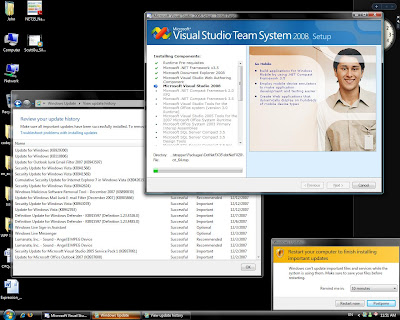
Why do you ask me to reboot when I'm in the middle of installing something? What's confusing here is that I don't know if this is related to the Visual Studio 2008 install or something else that was being installed in the background. Don't get me wrong, I am a fan of the silent updates, but it would be nice to understand what's going on here. Alas, the VS installation progress bar is still moving...

Subscribe to:
Posts (Atom)